


The $47,000 Week I Don't Talk About
I watched a distribution client lose $47,000 in a single week. Not from theft. Not from a lawsuit. From running out of three SKUs that represented 40% of their holiday revenue.
The painful part? They had plenty of inventory. Just not the right inventory. Their warehouse was packed with products that moved maybe twice a month. Meanwhile, the items customers actually wanted? Gone by Tuesday.
Here's what I've learned after watching this pattern destroy margins for two decades: the problem isn't that business owners don't care about inventory. They care too much—about the wrong things. They're staring at spreadsheets, making gut calls, and hoping they guessed right. There's a counterintuitive reason this approach keeps failing, even for smart operators. I'll get to that after we understand why traditional methods fall apart.
The math is brutal. According to ConverSight's research, 43% of businesses miss sales due to poor inventory forecasting. That's nearly half of all companies leaving money on the table because they can't predict what their customers will buy next week.
Why Does Half Your Inventory Sit While the Other Half Runs Out?
Traditional inventory management fails in predictable ways. I've seen every one of these kill a business's cash flow:
**Reactive decision-making.** You don't know you're out of stock until a customer asks for something and you can't deliver. By then, you've lost the sale and probably the customer. Sifars' analysis of stockout patterns shows most businesses respond to inventory problems only after they've already caused damage.
**Spreadsheet forecasting.** You're using last year's numbers to predict this year's demand. But last year didn't have a viral TikTok video about your product category. Last year didn't have your competitor's warehouse fire. Spreadsheets assume the future looks like the past. It rarely does.
**Human error cascade.** Manual data entry creates tiny mistakes that compound. A mistyped quantity here, a missed shipment there. Over months, your inventory records drift further from reality. You're making decisions based on numbers that haven't been accurate since March.
**Siloed data.** Your sales system doesn't talk to your inventory system. Your inventory system doesn't talk to your supplier portal. You're running a modern business with 1990s information flow.
How Does AI Inventory Management Actually Work?

AI inventory management software isn't magic. It's pattern recognition at scale—something humans are terrible at when dealing with thousands of SKUs and millions of data points.
According to IBM's technical documentation, AI enhances inventory management through data analysis, machine learning, and predictive analytics. But what does that actually mean for a business owner who just wants to stop running out of their best products?
Here's the breakdown:
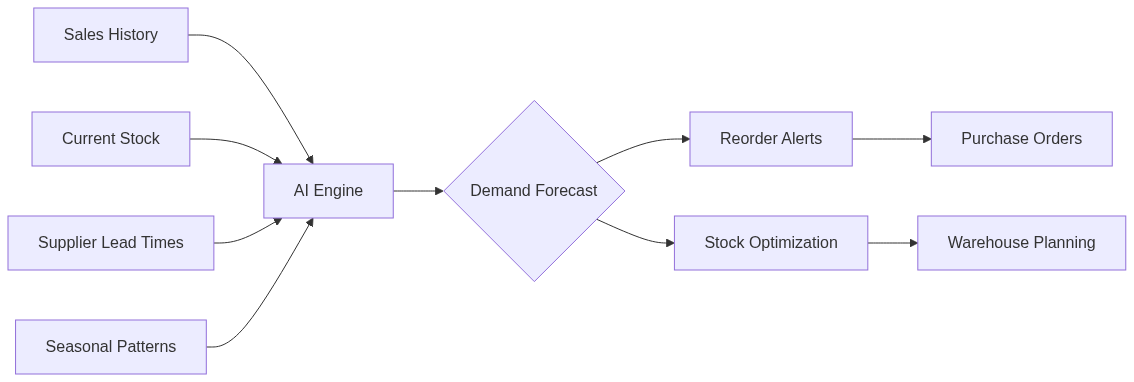
**Data ingestion.** The software connects to your sales history, current stock levels, supplier lead times, promotion schedules, and seasonal patterns. Netstock's implementation guide shows this typically takes 2-4 weeks for a mid-sized business with clean data.
**Pattern detection.** The system finds correlations you'd never spot manually. That product that always spikes when the temperature drops below 50 degrees? The AI notices. The SKU that sells 3x more when your competitor runs out? The AI catches that too.
**SKU-level prediction.** This is the key differentiator from traditional methods. Instead of forecasting categories ('we need more winter gear'), AI predicts specific items ('we need 340 units of the blue medium-weight jacket in size Large, delivered by October 15th').
**Automated alerts.** When inventory levels approach your custom thresholds, the system flags it before you run out—not after. eTurns' research shows businesses using real-time AI alerts reduce emergency orders by 60-70%.
The Uncomfortable Truth About AI Forecasting
Here's what the vendors won't tell you upfront, and the reason most businesses fail with these tools despite good intentions:
AI inventory management is not 'set it and forget it.'
StockIQ's implementation data shows that businesses treating AI as a magic box—plug it in and walk away—get worse results than their old spreadsheet methods. The technology amplifies whatever you feed it. If your processes are broken, AI breaks them faster.
The counterintuitive truth I promised earlier? The businesses that succeed with AI inventory management spend more time on strategy than they did before—not less. What changes is what they spend time on.
Before AI: Hours of data entry, manual counting, guessing at reorder points.
After AI: Hours of reviewing recommendations, adjusting for context the AI can't see, and making strategic decisions about supplier relationships.
The tool handles the tedious pattern-matching. You handle the judgment calls. That's the division of labor that actually works.
What Goes Wrong When You Flip the Switch?
I've watched three specific failure modes derail AI inventory implementations:
**Bad data in, bad forecasts out.** ConverSight's analysis is blunt: AI doesn't magically correct incomplete, messy, or inaccurate inputs. If your historical sales data is riddled with errors, the AI learns those errors. If you haven't been tracking returns separately from sales, the AI thinks you sold products you actually took back.
One client had two years of 'sales data' that included internal transfers between locations. The AI dutifully predicted demand that was 30% higher than reality because it thought those internal moves were customer purchases.
**The over-automation trap.** Businesses get excited about automation and remove human oversight too quickly. The AI recommends ordering 5,000 units of a product you're planning to discontinue next quarter. Without someone reviewing that recommendation, you've just created a warehouse problem.
**Integration nightmares.** Your inventory software needs to talk to your sales system, your supplier portals, and your warehouse management. Most small businesses run on a patchwork of tools that weren't designed to share data. Budget 30-40% of your implementation time for integration work.
How Do You Know If AI Inventory Management Is Right for Your Business?
Not every business needs AI inventory management software. Here's how to tell if you're a good fit:
**Good fit indicators:**
- You manage 500+ SKUs and can't keep track mentally
- Your stockouts or overstock situations cost you more than $50,000/year
- You have at least 12 months of clean sales history
- Your team spends 10+ hours weekly on manual inventory tasks
- You've outgrown spreadsheets but can't justify a full-time inventory planner
**Warning signs you're not ready:**
- Your sales data is incomplete or unreliable
- You change suppliers frequently without tracking history
- Your business model is changing rapidly (new products, new markets)
- You have fewer than 100 SKUs with predictable demand
If you're building out your broader AI operations strategy, inventory management often delivers the fastest ROI because the metrics are so clear. You either have the product when customers want it, or you don't.
Your First 30 Days With AI Inventory Management
If you decide to move forward, here's the implementation sequence that actually works:
- **Audit your data first (Days 1-7).** Export your sales history. Look for gaps, duplicates, and obvious errors. If more than 5% of records have issues, fix them before connecting any AI tool. Budget $500-2,000 for data cleanup if your records are messy.
- **Start with one category (Days 8-14).** Don't roll out across your entire inventory. Pick your top 50 SKUs by revenue—the products that matter most. If the AI works there, expand. If it breaks, you've limited the damage.
- **Set baseline metrics before you start.** Document your current stockout rate, days of inventory on hand, and carrying costs. You need these numbers to prove the AI is actually helping. Most businesses skip this step and can never demonstrate ROI.
- **Monitor exceptions daily for the first two weeks.** When the AI recommends something that seems wrong, investigate. Is the AI catching something you missed, or is it learning from bad data? The first month reveals which patterns are real.
- **Review weekly, not monthly.** Schedule 30 minutes every Monday to review AI recommendations against actual sales. Adjust thresholds. Flag products with unusual patterns. This weekly cadence catches problems before they become expensive.
- **Expand to additional categories only after 4 weeks of stable performance.** If your top 50 SKUs are forecasting within 15% accuracy, add the next 50. Grow methodically.
**Budget reality check:** Cloud-based AI inventory tools run $200-800/month for businesses with under 5,000 SKUs. Enterprise solutions start around $2,000/month. If a vendor won't give you clear pricing, walk away.
What Results Should You Expect?

Based on Netstock's implementation data across SMBs, realistic outcomes include:
- **Stockout reduction:** 40-60% fewer out-of-stock situations within 90 days
- **Excess inventory reduction:** 15-25% less dead stock within 6 months
- **Planning time savings:** 70% reduction in manual forecasting work
- **Cash flow improvement:** 10-20% less capital tied up in inventory
These results assume clean data and consistent oversight. The businesses that treat AI as a tool—not a replacement for thinking—see these numbers. The ones that expect magic see disappointment.
If you're also losing revenue to slow customer response times, the same data-driven approach applies. I covered how businesses are using AI for customer service to handle the front-end while AI inventory handles the back-end.
Frequently Asked Questions
How much does AI inventory management software cost for small businesses?
Cloud-based solutions for businesses with under 5,000 SKUs typically run $200-800/month. Enterprise tools start around $2,000/month. Netstock and similar SMB-focused platforms have made these tools accessible without enterprise budgets or data science teams. Factor in $500-2,000 for initial data cleanup if your records need work.
Can AI inventory management work with my existing systems?
Most modern AI inventory tools integrate with common platforms like QuickBooks, Shopify, and major ERPs. However, integration complexity varies. Budget 30-40% of your implementation timeline for connecting systems. If your current software doesn't have APIs or export capabilities, you may need middleware solutions.
How long before I see results from AI inventory management?
Businesses typically see measurable improvements within 90 days of proper implementation—specifically 40-60% fewer stockouts. However, this assumes you start with clean data and maintain weekly oversight. Companies that skip the data cleanup phase often see no improvement or worse results.
Do I need technical staff to run AI inventory software?
No. Modern cloud-based tools are designed for business users, not data scientists. You'll need someone who understands your inventory and can review AI recommendations—but that's business judgment, not technical skill. The AI handles the pattern recognition; you handle the context.
What happens when AI inventory forecasts are wrong?
They will be wrong sometimes—no forecasting method is perfect. The key is setting up review processes to catch errors before they become expensive. Most AI tools flag 'confidence levels' on predictions. Low-confidence forecasts need human review. High-confidence predictions can be automated. The goal is accuracy improvement over time, not perfection from day one.


